ComfyUI Wan2.2 Fun Control Video Generation Example
Wan2.2-Fun-Control is a next-generation video generation and control model launched by Alibaba PAI team. Through innovative Control Codes mechanism combined with deep learning and multi-modal conditional inputs, it can generate high-quality videos that comply with preset control conditions. The model is released under the Apache 2.0 license and supports commercial use.
Key Features:
- Multi-modal Control: Supports multiple control conditions including Canny (line art), Depth, OpenPose (human pose), MLSD (geometric edges), and trajectory control
- High-Quality Video Generation: Based on the Wan2.2 architecture, outputs film-level quality videos
- Multi-language Support: Supports multi-language prompts including Chinese and English
Below are the relevant model weights and code repositories:
- 🤗Wan2.2-Fun-A14B-Control
- Code repository: VideoX-Fun
Wan2.2 Fun Control Video Generation Workflow Example
- Portable or self deployed users
- Desktop or Cloud users
Make sure your ComfyUI is updated.
Workflows in this guide can be found in the Workflow Templates. If you can’t find them in the template, your ComfyUI may be outdated. (Desktop version’s update will delay sometime)
If nodes are missing when loading a workflow, possible reasons:
- You are not using the latest ComfyUI version (Nightly version)
- Some nodes failed to import at startup
- The Desktop is base on ComfyUI stable release, it will auto-update when there is a new Desktop stable release available.
- Cloud will update after ComfyUI stable release.
So, if you find any core node missing in this document, it might be because the new core nodes have not yet been released in the latest stable version. Please wait for the next stable release.
This workflow provides two versions:
- A version using Wan2.2-Lightning 4-step LoRA from lightx2v: may cause some loss in video dynamics but offers faster speed
- A fp8_scaled version without acceleration LoRA
Below are the test results using an RTX4090D 24GB VRAM GPU at 640×640 resolution with 81 frames
| Model Type | VRAM Usage | First Generation Time | Second Generation Time |
|---|---|---|---|
| fp8_scaled | 83% | ≈ 524s | ≈ 520s |
| fp8_scaled + 4-step LoRA | 89% | ≈ 138s | ≈ 79s |
Since using the 4-step LoRA provides a better experience for first-time workflow users, but may cause some loss in video dynamics, we have enabled the accelerated LoRA version by default. If you want to enable the other workflow, select it and use Ctrl+B to activate.
1. Download Workflow and Materials
Download the video below or JSON file and drag it into ComfyUI to load the workflow
[
Download JSON Workflow
Please download the following images and videos as input materials.

Input start image
We use a preprocessed video here.
2. Models
You can find the models below at Wan_2.2_ComfyUI_Repackaged
Diffusion Model
Wan2.2-Lightning LoRA (Optional, for acceleration)
VAE
Text Encoder
ComfyUI/
├───📂 models/
│   ├───📂 diffusion_models/
│   │   ├─── wan2.2_fun_control_low_noise_14B_fp8_scaled.safetensors
│   │   └─── wan2.2_fun_control_high_noise_14B_fp8_scaled.safetensors
│   ├───📂 loras/
│   │   ├─── wan2.2_i2v_lightx2v_4steps_lora_v1_high_noise.safetensors
│   │   └─── wan2.2_i2v_lightx2v_4steps_lora_v1_low_noise.safetensors
│   ├───📂 text_encoders/
│   │   └─── umt5_xxl_fp8_e4m3fn_scaled.safetensors
│   └───📂 vae/
│       └── wan_2.1_vae.safetensors
3. Workflow Guide
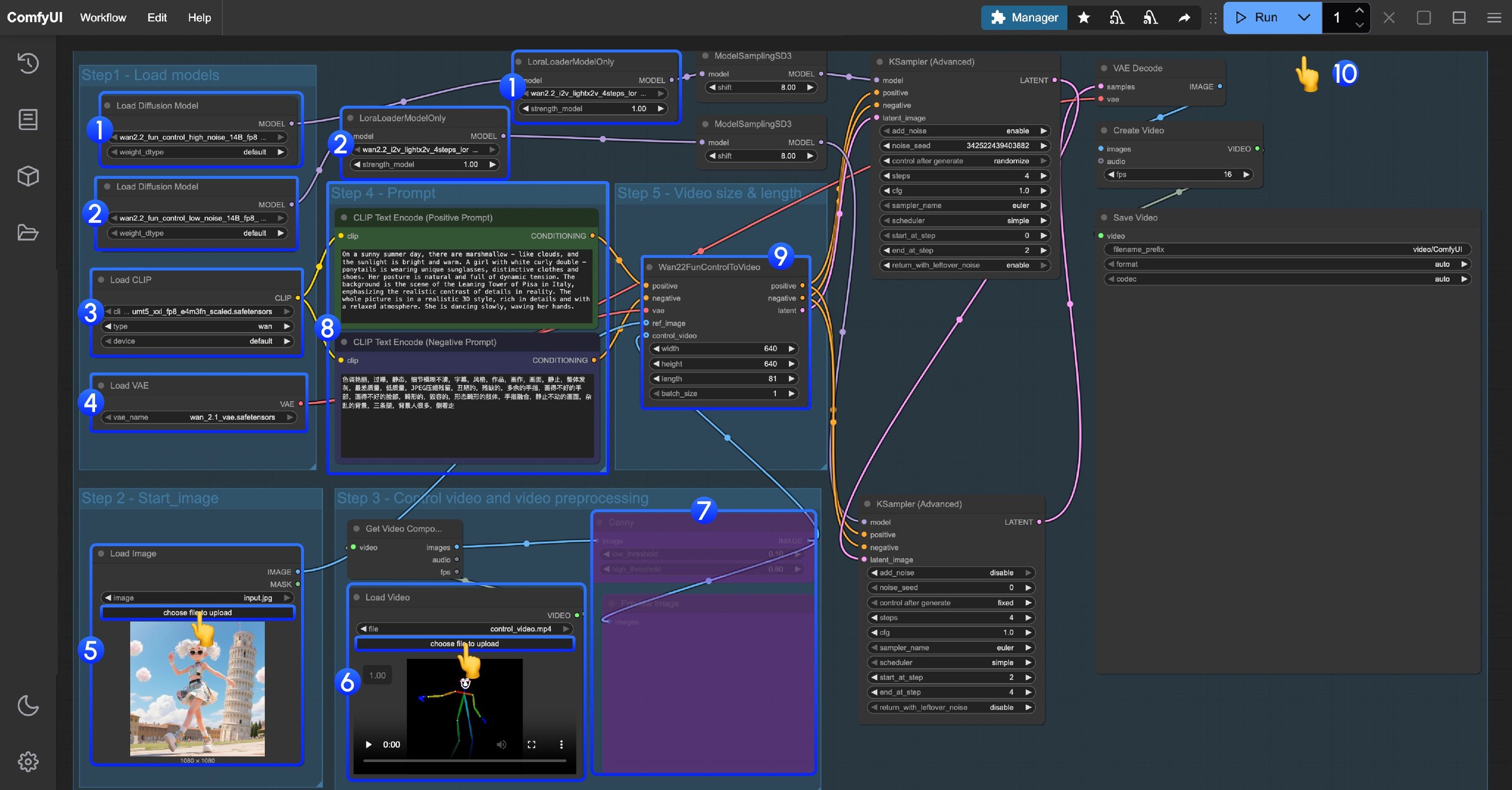
Wan2.2 Fun Control Workflow Steps
This workflow uses LoRA. Please ensure the corresponding Diffusion model and LoRA are matched - high noise and low noise models and LoRAs need to be used correspondingly.
- High noise model and LoRA loading
- Ensure the
Load Diffusion Modelnode loads thewan2.2_fun_control_high_noise_14B_fp8_scaled.safetensorsmodel- Ensure the
LoraLoaderModelOnlynode loads thewan2.2_i2v_lightx2v_4steps_lora_v1_high_noise.safetensors
- Ensure the
- Ensure the
- Low noise model and LoRA loading
- Ensure the
Load Diffusion Modelnode loads thewan2.2_fun_control_low_noise_14B_fp8_scaled.safetensorsmodel- Ensure the
LoraLoaderModelOnlynode loads thewan2.2_i2v_lightx2v_4steps_lora_v1_low_noise.safetensors
- Ensure the
- Ensure the
- Ensure the
Load CLIPnode loads theumt5_xxl_fp8_e4m3fn_scaled.safetensorsmodel - Ensure the
Load VAEnode loads thewan_2.1_vae.safetensorsmodel - Upload the start frame in the
Load Imagenode - In the second
Load videonode, load the pose control video. The provided video has been preprocessed and can be used directly - Since we provide a preprocessed pose video, the corresponding video image preprocessing node needs to be disabled. You can select it and use
Ctrl + Bto disable it - Modify the Prompt - you can use both Chinese and English
- In
Wan22FunControlToVideo, modify the video dimensions. The default is set to 640×640 resolution to avoid excessive processing time for users with low VRAM - Click the
Runbutton, or use the shortcutCtrl(cmd) + Enterto execute video generation
Additional Notes
Since ComfyUI’s built-in nodes only include Canny preprocessor, you can use tools like ComfyUI-comfyui_controlnet_aux to implement other types of image preprocessing